01 · SaaS · Productivity Dashboard
Timebox
Turning chaotic to-do lists into a calm, visual timetable for deep work.
- Domain
- app.timebox.ai ↗
- Role
- Design research, prototyping, design system
- Team
- Team
- Duration
- 18 months
- Status
- Research / Live beta
Project visuals
Overview
AI-powered time management for deep work.
Timebox.ai is an AI-powered productivity platform designed to help knowledge workers (product managers, designers, developers, entrepreneurs, and freelancers) organize their daily work through intelligent scheduling, time blocking, prioritization, and AI-assisted planning.
Instead of simply creating task lists, the product focuses on transforming goals into actionable schedules that reduce decision fatigue and improve execution. The core insight: people spend more time planning than doing. The solution: an AI-first planning experience that captures ideas instantly, prioritizes automatically, and generates realistic daily schedules.
Role: Senior Product Designer | Timeline: 4–6 Weeks (Concept UX Analysis) | Platforms: Web & Mobile
The problem
Planning overload, priority confusion, context chaos.
Planning Overload
Users spend too much time organizing tasks instead of executing them. Every tool requires manual setup, prioritization, and constant reorganization.
Priority Confusion
Everything appears urgent. Without intelligent filtering, users lack clear guidance on what to work on next, leading to reactive decision-making.
Context Switching
Fragmented tools (tasks, calendar, notes) force constant context switching. Studies show it takes 23 minutes to regain deep focus after an interruption.
Unrealistic Scheduling
Users underestimate task duration and overestimate daily capacity. One busy day breaks the entire schedule, causing users to abandon planning entirely.
Design vision
An intelligent productivity assistant that thinks for the user.
Instead of asking "What should I do next?", Timebox answers "Here's the best task to work on now."
The product combines AI-assisted planning with intuitive time-blocking, reducing planning friction while keeping users in control. Every feature is designed to minimize cognitive load while maximizing execution.
Core features
Seven pillars of the experience.
1. AI Planning
User enters goals. AI generates tasks, schedules, priorities, and time estimates automatically.
2. Smart Time Blocking
Automatically places tasks into calendar slots. Less planning, better focus, balanced workload.
3. Priority Management
Supports drag & drop, importance/urgency ratings, and AI recommendations.
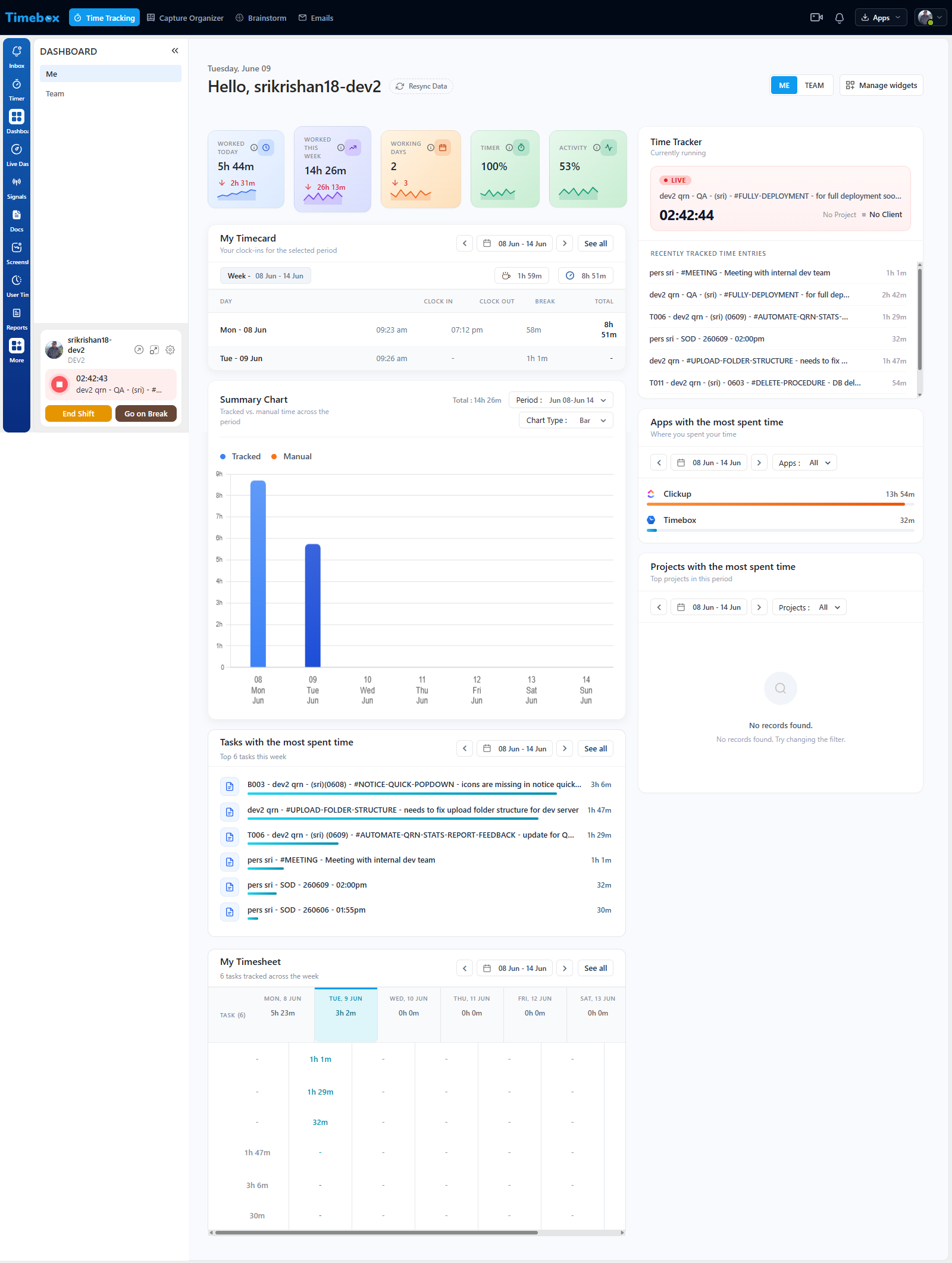
4. Daily Dashboard
Displays today's agenda, current task, remaining hours, progress, and focus score at a glance.
5. Calendar Integration
Syncs with Google Calendar, Outlook, and Apple Calendar to keep schedules aligned.
6. Daily Reflection
End-of-day review with personalized AI feedback and productivity insights.
7. Weekly Analytics
Dashboard showing completion rate, focus hours, time distribution, productivity trends, and mood trends for continuous improvement.
UX improvements
Reducing friction at every step.
AI Quick Capture
Current: Manual typing required. Improvement: Voice input with natural language processing. Example: "Tomorrow morning finish homepage design."
Smart Rescheduling
When meetings change, AI automatically reorganizes remaining tasks without user intervention.
Focus Mode
Hide everything except current task, timer, and notes to minimize distractions and maximize focus.
Energy-Based Planning
Schedule high-energy work during peak productivity hours based on user's historical patterns.
Adaptive Notifications
Instead of generic reminders, AI provides personalized insights: "You usually finish design work fastest between 10–12 AM."
Design principles
Minimal, calm, and action-oriented.
Minimal
Reduce cognitive load. Every element serves execution.
Calm
Soft neutral colors and generous white space.
Action-Oriented
One primary CTA per screen, clear next steps.
AI Transparency
Explain why AI made recommendations, keeping users informed.
Success metrics
Measuring impact across UX and product.
Product Metrics
- Daily Active Users
- Weekly Retention
- Task Completion Rate
- Average Focus Hours
- AI Recommendation Acceptance Rate
UX Metrics
- SUS Score (System Usability Scale)
- Time to Create Schedule
- Feature Adoption Rate
- User Satisfaction (NPS)
- ↓ Planning Time (60% target)
Key takeaways
Lessons from designing an AI-first product.
1. AI should simplify decisions, not replace user control. The best AI interactions feel like helpful suggestions, not automatic decisions.
2. Visual clarity matters more than feature quantity. A single-screen dashboard beats 20 buried options every time.
3. Time blocking works best when schedules remain flexible. Rigid plans fail; adaptive schedules with drag-to-resize interactions keep users engaged.
4. Small daily reflections reinforce long-term habits. Asking users to reflect on what went well builds continuous improvement into the daily routine.
5. Personalization increases trust and sustained engagement. Showing users why AI made a recommendation builds confidence and long-term product stickiness.
Story of transformation
What changed, and what triggered the change.
Before
Schedules edited through nested modals, a permanent multi-day backlog, a high-contrast countdown widget dominating the screen.
The turn
Watching a user abandon their afternoon because a single 15-minute overrun broke the whole schedule visually.
After
Direct edge-dragging on the timetable, a clean single-day Focus Pool, and an ambient progress ring that only reveals numbers on hover.
Next case study
Queensland Judgments
Re-engineering a 1907 statutory legal platform into a dual-lane digital ecosystem.